
Dialog: "Configure detection of suggested views"
This dialog lets you configure how Visplore suggests the most relevant 1D and 2D views during a comparison workflow — for example, when comparing operational states, process outcomes, or user-defined selections.
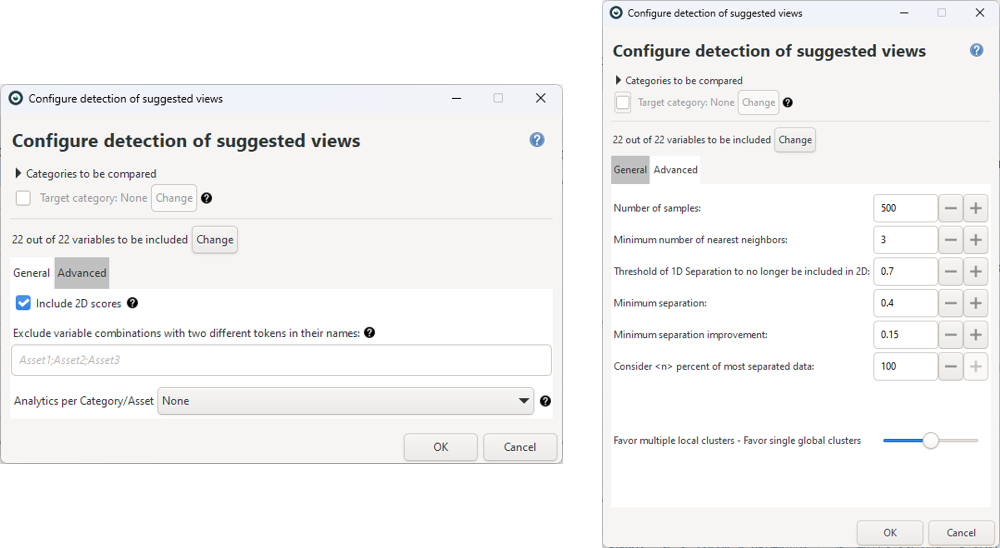
- Categories to be compared: Define which categories or selections should be included in the comparison.
- Target category: You can also specify a target category to evaluate how well that specific group stands out from the others.
- Variables to be included: You can choose which individual variables and variable pairs should be considered when computing separation. This is useful for narrowing down the analysis to only relevant signals (e.g., pressure, temperature).
- Include 2D scores: When enabled, Visplore will also evaluate combinations of two variables and compute how well the value pairs separate the categories.
- Exclude variable combinations: If your variables contain identifiers (like asset names), this setting helps exclude cross-asset combinations (e.g., Asset1_Temp and Asset2_Pressure).
- Analytics per Category/Asset: Set a variable by which you would like to split the calculation based on its categories.
- Advanced Tab: These options control how separation is calculated under the hood. You generally don’t need to adjust them unless you want to refine performance or results.
Advanced Tab: These options control how separation is calculated under the hood. You generally don’t need to adjust them unless you want to refine performance or results.
- Number of samples: Controls how many samples are used to compute the separation.
- Minimum number of nearest neighbors: This sets how many neighboring data points are considered when evaluating how tightly clustered a category is, and how separated it is from others.
- Threshold for 1D Separation to no longer be included in 2D: Variable pairs will be excluded if their individual 1D separation is too strong already.
- Minimum separation: Only views with at least this separation score are considered.
- Minimum separation improvement: Ensures that 2D views offer added value beyond their 1D components.
- Consider <n> percent of most separated data: Focuses the separation computation on the top-scoring part of the dataset. 100% = full data used.
- Cluster slider (local vs. global): Adjusts the detection preference between many small local clusters and few global ones. Move left if you care about subtle anomalies or local behavior differences. Move right if you're comparing major states or clean process phases.